Independent reviews. No paid rankings. No sponsored placements.

Overview
Wi-Fi dead zones—areas in your home with weak or no signal—are a common issue caused by distance, interference, and structural barriers. Whether you’re dealing with dropped video calls, buffering streams, or slow downloads, solving coverage gaps is essential for modern connected homes.
The two most common solutions are Wi-Fi mesh systems and Wi-Fi extenders (repeaters). While both aim to improve coverage, they differ significantly in performance, cost, scalability, and ease of use.
This guide explains how to diagnose dead zones, compares mesh vs. extenders, and provides a step-by-step approach to choosing the right solution.
What Causes Wi-Fi Dead Zones?


Common Causes
- Distance from router: Signal weakens over space
- Physical barriers: Concrete, brick, metal walls
- Interference: Other Wi-Fi networks, microwaves, Bluetooth
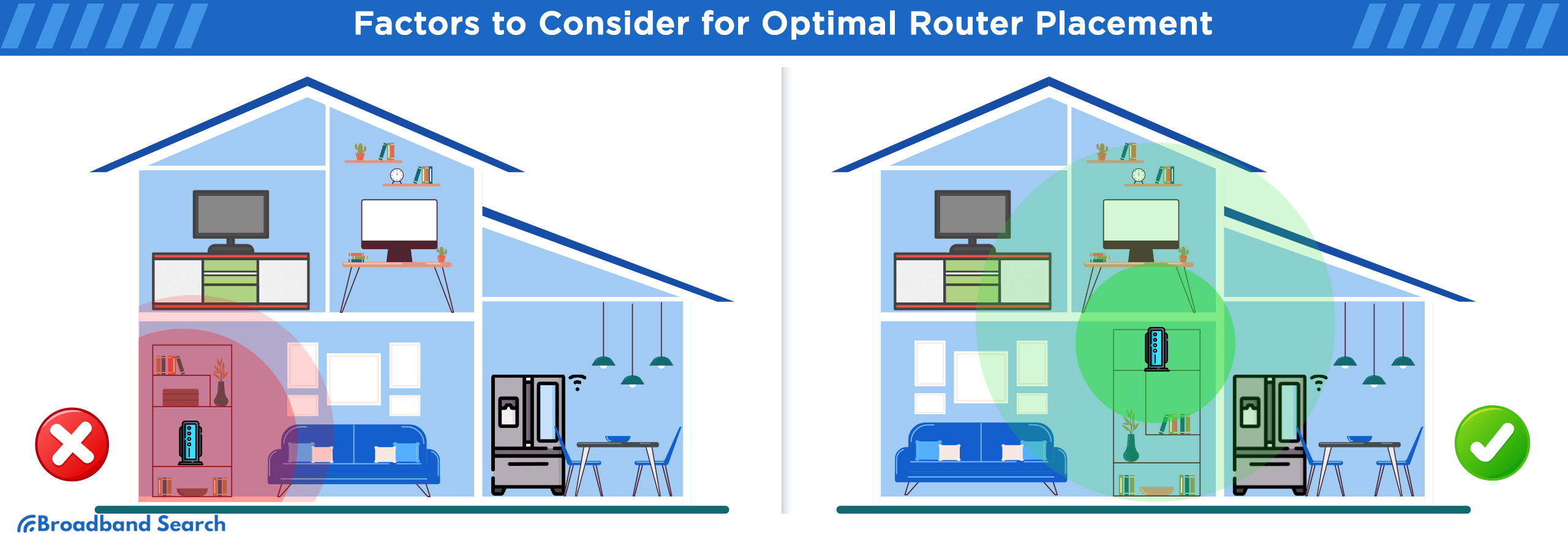
- Poor router placement: Hidden corners or enclosed spaces
- Outdated hardware: Older routers with limited range
Step 1: Identify Your Dead Zones
Before choosing a solution, map your weak signal areas.
How to Test Wi-Fi Strength
- Use apps like WiFi Analyzer or NetSpot
- Walk through your home and note signal drops
- Run speed tests in different rooms
Signal Strength Guide
| Signal Level | Quality | Experience |
|---|---|---|
| -30 to -50 dBm | Excellent | Full speed, stable |
| -50 to -70 dBm | Good | Minor slowdowns |
| -70 to -80 dBm | Weak | Buffering, drops |
| Below -80 dBm | Very weak | Unusable |
Step 2: Try Basic Fixes First
Many dead zones can be improved without new hardware.
Quick Optimization Tips
- Move router to a central, elevated position
- Avoid placing near walls or metal objects
- Switch to 5GHz band for speed (short range)
- Use 2.4GHz band for longer range
- Update router firmware
Mesh vs Extenders: Core Differences
At a Glance Comparison
| Feature | Mesh Wi-Fi System | Wi-Fi Extender (Repeater) |
|---|---|---|
| Network Type | Single unified network | Separate network |
| Performance | High, consistent | Moderate, may drop speed |
| Setup Complexity | Easy | Easy–Moderate |
| Scalability | Excellent | Limited |
| Cost | Higher upfront | Budget-friendly |
| Roaming | Seamless | Often disconnects/reconnects |
What Is a Mesh Wi-Fi System?
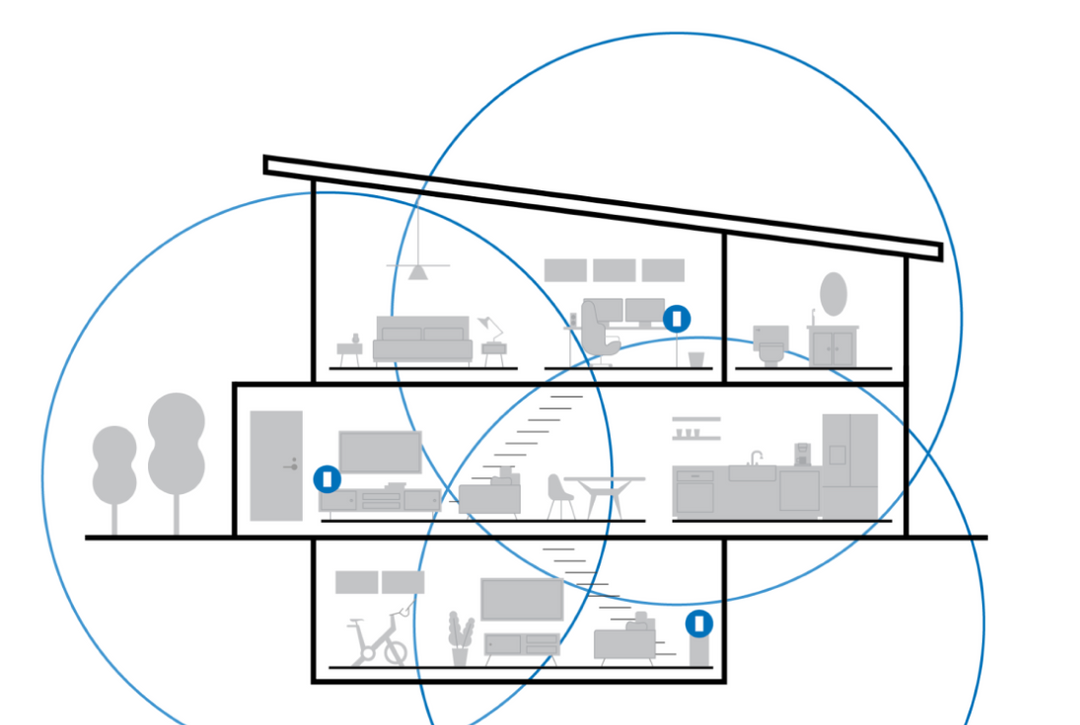


A mesh system uses multiple nodes to create a single, seamless Wi-Fi network across your home.
How It Works
- One main router connects to your modem
- Additional nodes extend coverage
- Devices automatically connect to the strongest node
Advantages
- Seamless roaming (no manual switching)
- Consistent speed across rooms
- Centralized management via one app
- Ideal for large homes
Limitations
- Higher cost
- Requires multiple devices (nodes)
What Is a Wi-Fi Extender?

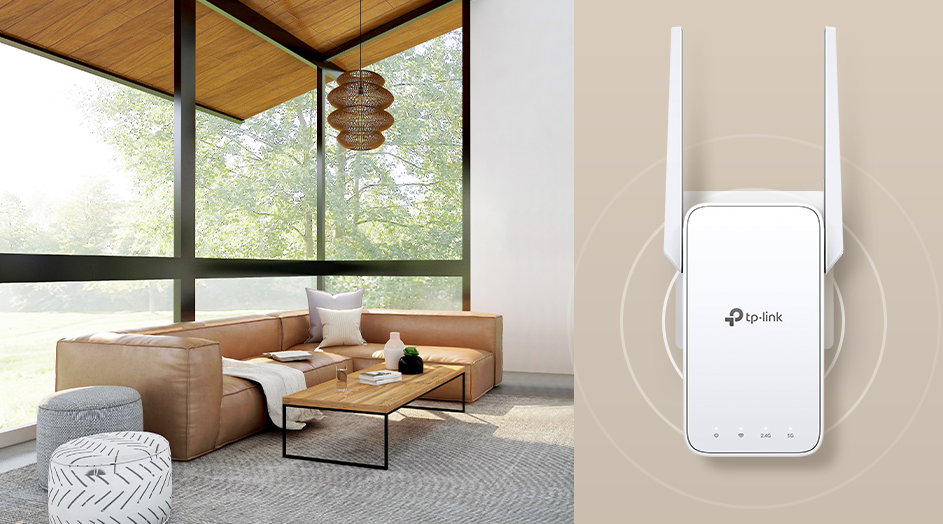


A Wi-Fi extender rebroadcasts your existing signal to extend coverage.
How It Works
- Connects to your router’s Wi-Fi
- Repeats signal into weak areas
Advantages
- Affordable
- Easy to install
- Good for small coverage gaps
Limitations
- Speed reduction (often 30–50%)
- Separate network name (SSID) in many cases
- Less reliable for multiple devices
Step 3: Choose the Right Solution
Choose a Mesh System If:
- You have a medium to large home (1500+ sq ft)
- Multiple floors or thick walls
- Many connected devices (10+)
- Need seamless roaming
Choose an Extender If:
- You have a small apartment or single dead zone
- Budget is limited
- You only need to fix one room
Real-World Use Case Comparison
| Scenario | Best Solution |
|---|---|
| Small apartment | Extender |
| Multi-story house | Mesh |
| Gaming/streaming setup | Mesh |
| Single room dead zone | Extender |
| Smart home (many devices) | Mesh |
Step 4: Placement Best Practices
Mesh Node Placement
- Place nodes evenly between router and dead zones
- Avoid placing too far apart
- Keep in open areas
Extender Placement
- Place halfway between router and dead zone
- Ensure it still receives strong signal
Performance Comparison (2026)
| Metric | Mesh System | Extender |
|---|---|---|
| Speed Retention | 80–95% | 50–70% |
| Latency | Low | Medium–High |
| Stability | High | Moderate |
| Coverage | Whole-home | Limited area |
Cost Breakdown
| Solution | Price Range (2026) |
|---|---|
| Wi-Fi Extender | $20–$80 |
| Mesh System (2–3 nodes) | $120–$400 |
| Premium Mesh | $400+ |
Common Mistakes to Avoid
- Placing extender in a dead zone (it needs signal to repeat)
- Buying too few mesh nodes
- Ignoring interference sources
- Using outdated routers with new extenders
- Overlapping networks unnecessarily
Advanced Alternatives
Powerline Adapters
- Use electrical wiring to extend network
- Good for thick walls
Wired Access Points
- Best performance (requires Ethernet wiring)
Upgrading Router
- Modern Wi-Fi 6/6E routers improve coverage significantly
Pros and Cons Summary
Mesh Systems
Pros
- Seamless experience
- Strong performance
- Scalable
Cons
- Higher cost
- Overkill for small spaces
Wi-Fi Extenders
Pros
- Affordable
- Easy setup
Cons
- Reduced speed
- Less reliable roaming
Expert Recommendations
- Start with router placement optimization
- For long-term use, invest in mesh systems
- Use extenders only as a quick, budget fix
- Prioritize Wi-Fi 6/6E devices for future-proofing
Final Verdict
Both mesh systems and extenders solve Wi-Fi dead zones, but they serve different needs.
- Mesh Wi-Fi systems are the best long-term solution for reliability, speed, and scalability
- Wi-Fi extenders are a practical short-term fix for small coverage issues
For most modern homes—especially those with multiple devices and rooms—mesh systems offer superior performance and user experience.
Overall Rating (Coverage Solutions)
| Category | Mesh Wi-Fi | Extender |
|---|---|---|
| Ease of Use | 4.6 | 4.4 |
| Performance | 4.8 | 3.8 |
| Cost Efficiency | 4.2 | 4.7 |
| Scalability | 4.9 | 3.5 |
| Reliability | 4.7 | 3.9 |
FAQ
Do mesh systems replace your router?
Yes, most mesh systems act as your primary router.
Can I use both mesh and extenders together?
Not recommended—can cause interference and complexity.
Why does my extender slow down Wi-Fi?
It retransmits signals, reducing bandwidth efficiency.
How many mesh nodes do I need?
Typically 2–3 for average homes; more for larger spaces.
Is Wi-Fi 6 necessary?
Not required, but recommended for better performance and future-proofing.